![[EN] Resolving CMMVC8478E & CMMVC8480E (Volume Deletion) Errors in IBM FlashSystem and IBM SVS](https://kadirkozan.com/wp-content/uploads/2026/02/ibm-storage-logo.png)

IBM Spectrum Virtualize–based storage systems, especially the FlashSystem, SVC, and Storwize families, have very strict and intelligent protection mechanisms regarding data security.
These protection layers often save the day, but during certain operational tasks they may appear as an obstacle to administrators.
Especially when you want to delete a Volume (vdisk) or remove a host mapping connection, you may encounter one of the following error messages.
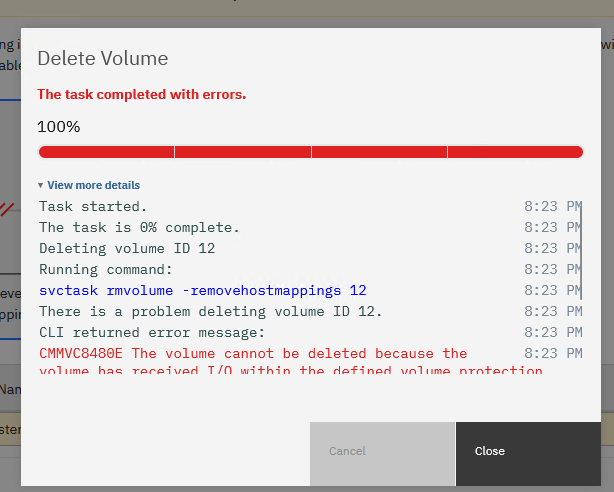
Task started. 8:23 PM
The task is 0% complete. 8:23 PM
Deleting volume ID 12 8:23 PM
Running command: 8:23 PM
svctask rmvolume -removehostmappings 12 8:23 PM
There is a problem deleting volume ID 12. 8:23 PM
CLI returned error message: 8:23 PM
CMMVC8480E The volume cannot be deleted because the volume has received I/O within the defined volume protection period. 8:23 PM
Synchronizing memory cache. 8:23 PM
The task is 100% complete. 8:23 PM
The task completed with errors
CMMVC8480E: The volume cannot be deleted because the volume has received I/O within the defined volume protection period.
CMMVC8478E: The mapping cannot be removed because the volume being unmapped has received I/O within the defined volume protection period.Although it may seem confusing at first glance, the system is actually telling you the following:
“Data was written to this volume recently. The deletion operation may be risky.”
In this article, we will examine step by step the logic behind this restriction caused by the Volume Protection feature and how to manage it safely via CLI.
What Is Volume Protection?
In the IBM Spectrum Virtualize architecture, Volume Protection is a security mechanism developed to prevent accidental data loss.
The system logic is quite simple:
- If a volume has received I/O within the last X minutes,
- When you attempt to delete this volume or remove its mapping,
- The system automatically blocks the operation.
This period is generally set to 15 minutes by default, but it may vary depending on the system configuration.
The Real Causes of This Error
- Active I/O Traffic
The volume has received data traffic from the connected host. Sometimes this traffic may not be visible at the application level; background services or disk scans may also generate I/O.
- Accidental Deletion Protection
IBM deliberately stops you at this point. Because deleting an actively used LUN can cause critical data loss.
- Default Global Setting
In newer IBM FlashSystem and SVC versions, this feature comes Enabled by default.
Solution: Temporarily Disabling Volume Protection via CLI
If you are certain that the volume must be deleted and you have verified that the host connection has been disconnected, you may follow the steps below.
Note: It is recommended to perform this action only during a controlled maintenance window and with full awareness of the risks.
Checking the Current Status
First, check whether Volume Protection is active on the system.
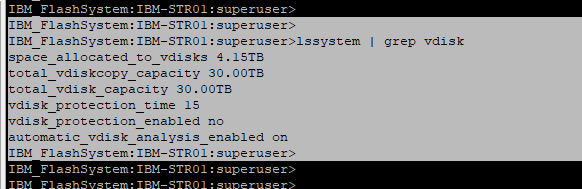
lssystem | grep vdiskIn the output, you will generally see the following lines:
vdisk_protection_enabled yes
vdisk_protection_time 15
Here:
- yes → Protection is active
- 15 → A volume that has received I/O within 15 minutes cannot be deleted
Disabling the Volume Protection Feature
To temporarily disable protection:
svctask chsystem -vdiskprotectionenabled noThis command changes the global setting.
Verifying the Setting
lssystem | grep vdisk_protection_enabledThe output should be:
vdisk_protection_enabled noRetrying the Deletion or Mapping Removal Operation
You can now retry the operation that previously returned an error:
svctask rmvolume -removehostmappings <volume_id>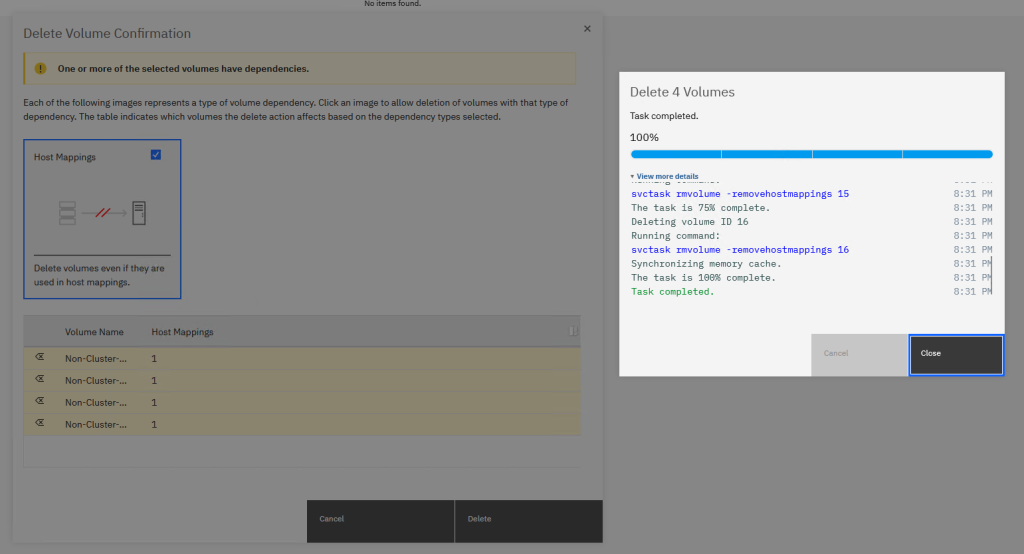
At this stage, the operation will complete without issues.
The Most Important Step After the Operation
Volume Protection is a critical security layer for your system. After completing your operation, you must re-enable it.
svctask chsystem -vdiskprotectionenabled yesWhy You Should Not Disable This Feature Permanently
Volume Protection:
- Reduces the risk of accidental LUN deletion
- Minimizes human error
- Prevents data loss in production environments
- Creates a security barrier, especially in large SAN environments
In short, this feature is not an obstacle it is a seatbelt.

![[TR] IBM FlashSystem ve IBM SVS’de CMMVC8478E & CMMVC8480E (Volume Silinmesi) Hatalarının Giderilmesi](https://kadirkozan.com/wp-content/uploads/2026/02/ibm-storage-logo-150x150.png)
![[TR] LogonTracker (JPCERTCC) ile Active Directory Ortamlarında Kötü Amaçlı Oturumların Derinlemesine Analizi](https://kadirkozan.com/wp-content/uploads/2026/02/Microsoft_Active_Directory-150x150.webp)