![[EN] How to Resolve the “No Heartbeat Datastores Are Configured” Warning in HPE VM Essentials](https://kadirkozan.com/wp-content/uploads/2026/05/hpe_morpheus-ikona.jpg)

When high availability features are enabled in an HPE VM Essentials environment, you may occasionally encounter the following warning:
This cluster is configured to auto-recover VMs, but no heartbeat datastores are configured. Please configure a shared heartbeat datastore to enable failover functionality.
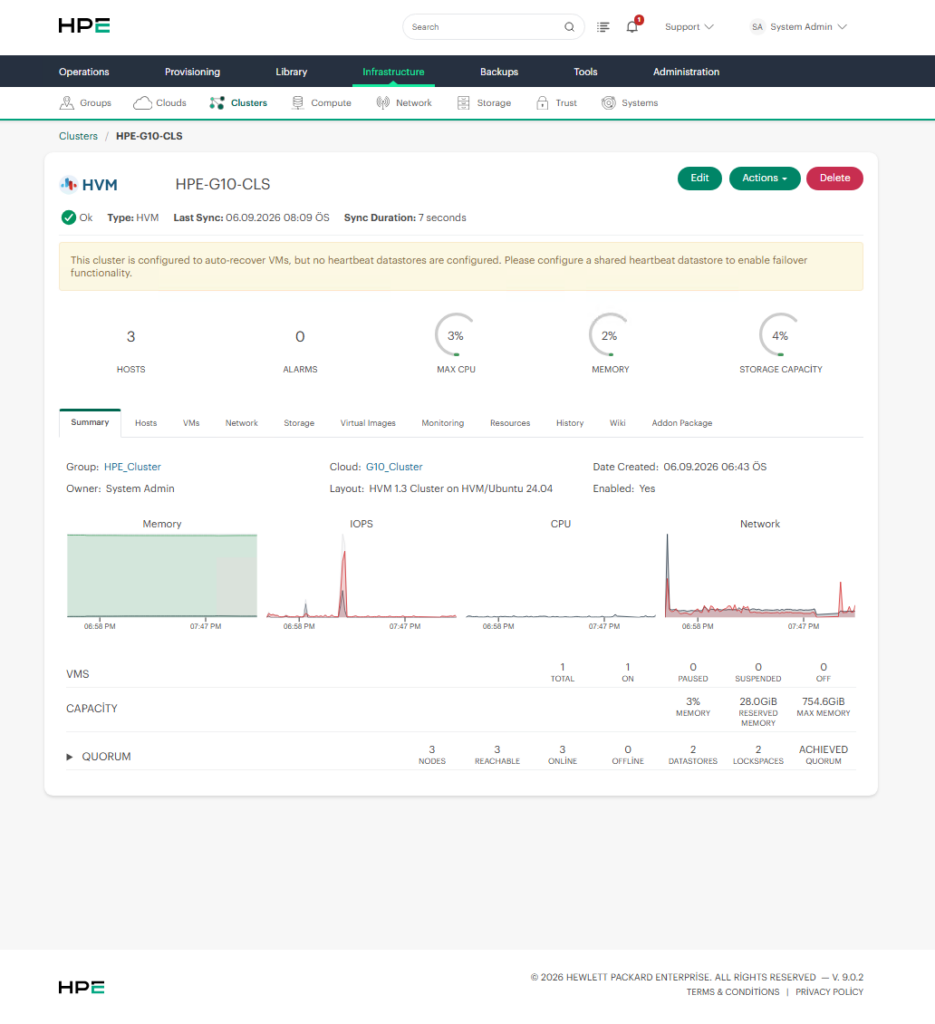
This warning indicates that automatic VM recovery and failover are enabled on the cluster, but no shared datastore has been configured as a Heartbeat Datastore.
Without a heartbeat datastore, the cluster may not be able to reliably determine the status of its hosts or perform automatic VM recovery when a host becomes unavailable. For this reason, configuring a proper heartbeat datastore is an important part of a highly available HPE VM Essentials environment.
What Is a Heartbeat Datastore?
A Heartbeat Datastore is a shared datastore that can be accessed by all hosts in the cluster.
It is used as part of the cluster’s health monitoring and failover mechanism. When a host becomes unreachable, heartbeat information can help the cluster determine whether the host is actually down and whether recovery actions should be initiated.
For example, a three-host cluster can be represented as follows:
HVM01 ─┐
HVM02 ─┼── Shared Datastore
HVM03 ─┘
              │
              └── Heartbeat Target
The most important requirement is that the datastore selected for heartbeat purposes must be accessible by all hosts in the cluster.
Local storage, or a datastore that is visible to only one host, should not be used as a heartbeat datastore.
What Causes This Warning?
The warning usually appears when the following conditions exist:
- Auto Recovery / Failover is enabled on the cluster.
- No shared datastore has been configured as a Heartbeat Target.
In other words, the cluster is configured to recover virtual machines automatically, but it does not have a shared location that can be used for heartbeat operations.
How to Resolve the Issue
Log in to the HPE VM Essentials interface and navigate to the relevant cluster.
The menu path is typically:
Infrastructure → Clusters → Select the Cluster → Storage → Data Stores
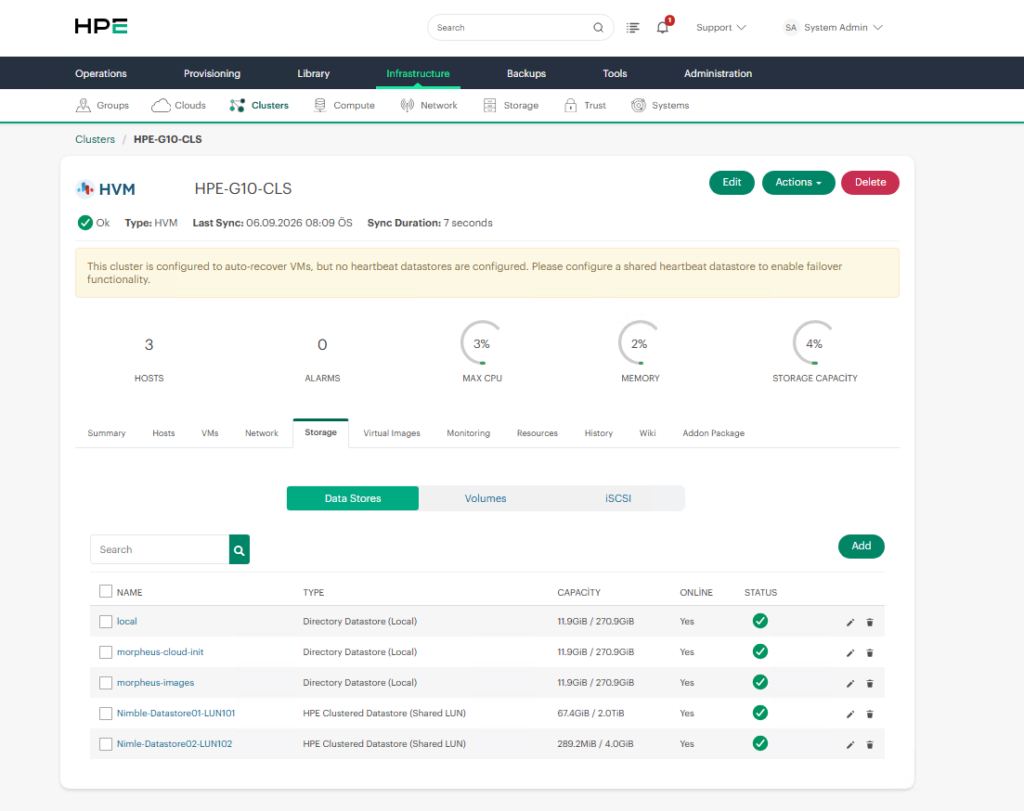
On this page, you can view the datastores associated with the cluster.
The datastore selected for heartbeat operations should meet the following requirements:
- It must be accessible by all hosts in the cluster.
- It must reside on shared storage.
- All hosts must have read/write access to it.
- The datastore must be healthy and available.
Depending on the storage architecture, this may be an NFS datastore, a GFS2-based datastore, or another supported shared datastore type.
Configure the Datastore as a Heartbeat Target
Once a suitable shared datastore has been identified, open its configuration.
Navigate to:
Infrastructure → Clusters → Cluster → Storage → Data Stores
Then perform the following steps:
- Select the shared datastore you want to use.
- Click Edit or the pencil icon.
- Enable the Heartbeat Target option.
- Save the changes.
The configuration should look conceptually like this:
Shared Datastore
       │
       └── Heartbeat Target: Enabled
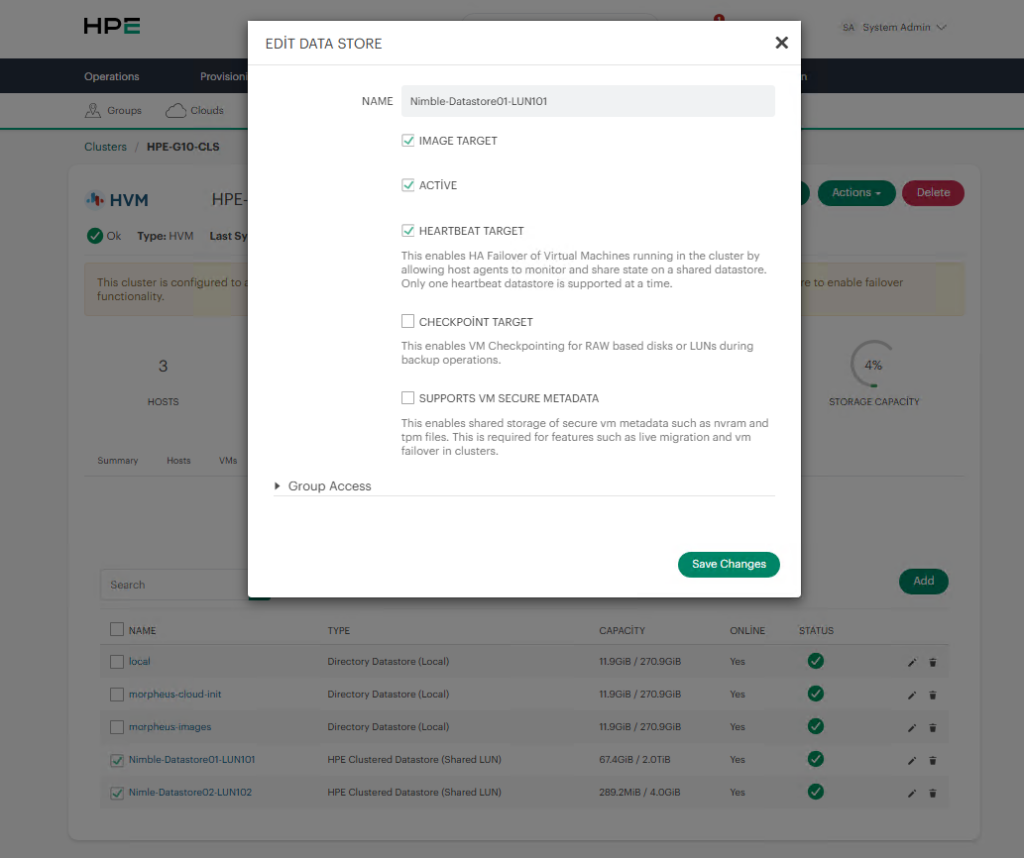
After the configuration is saved, the cluster can begin using the datastore for heartbeat operations.
Verify Shared Datastore Accessibility
Before configuring a datastore as a heartbeat target, it is important to verify that every host in the cluster can access it.
For example, if the cluster contains the following hosts:
HVM01
HVM02
HVM03
the heartbeat datastore must be accessible by all three hosts.
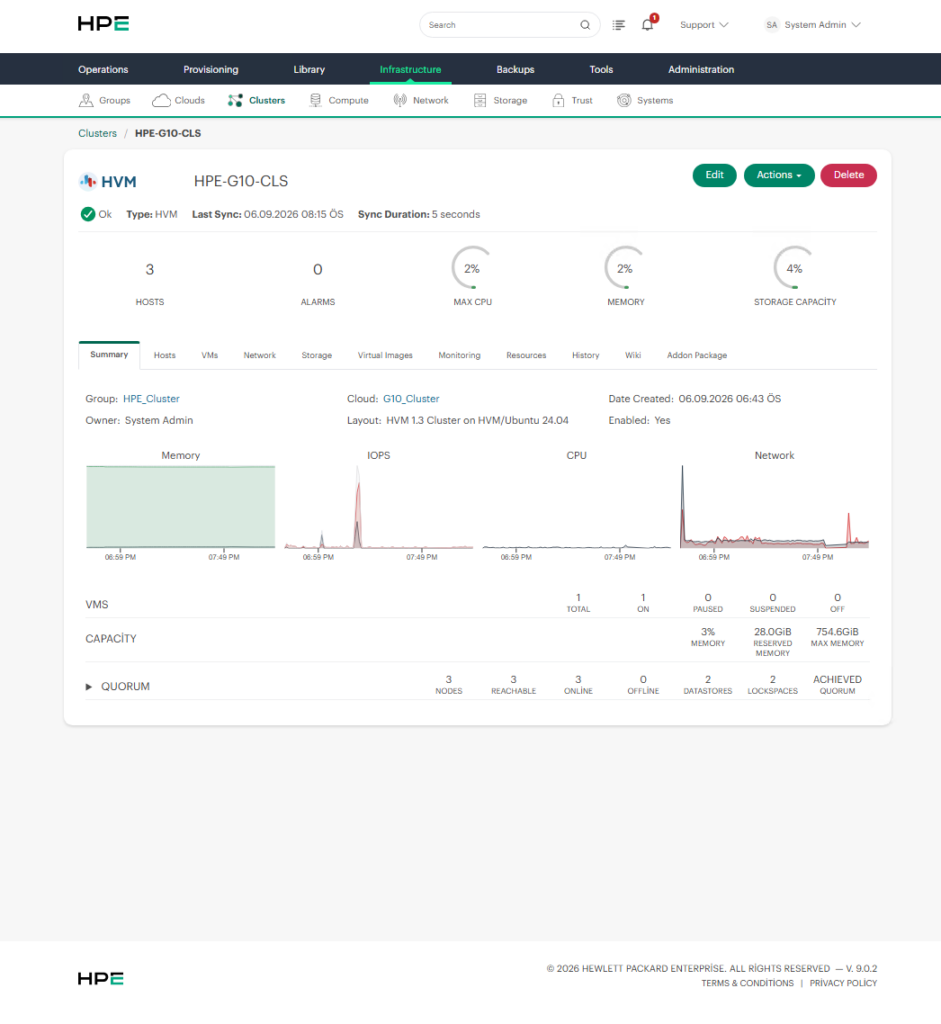
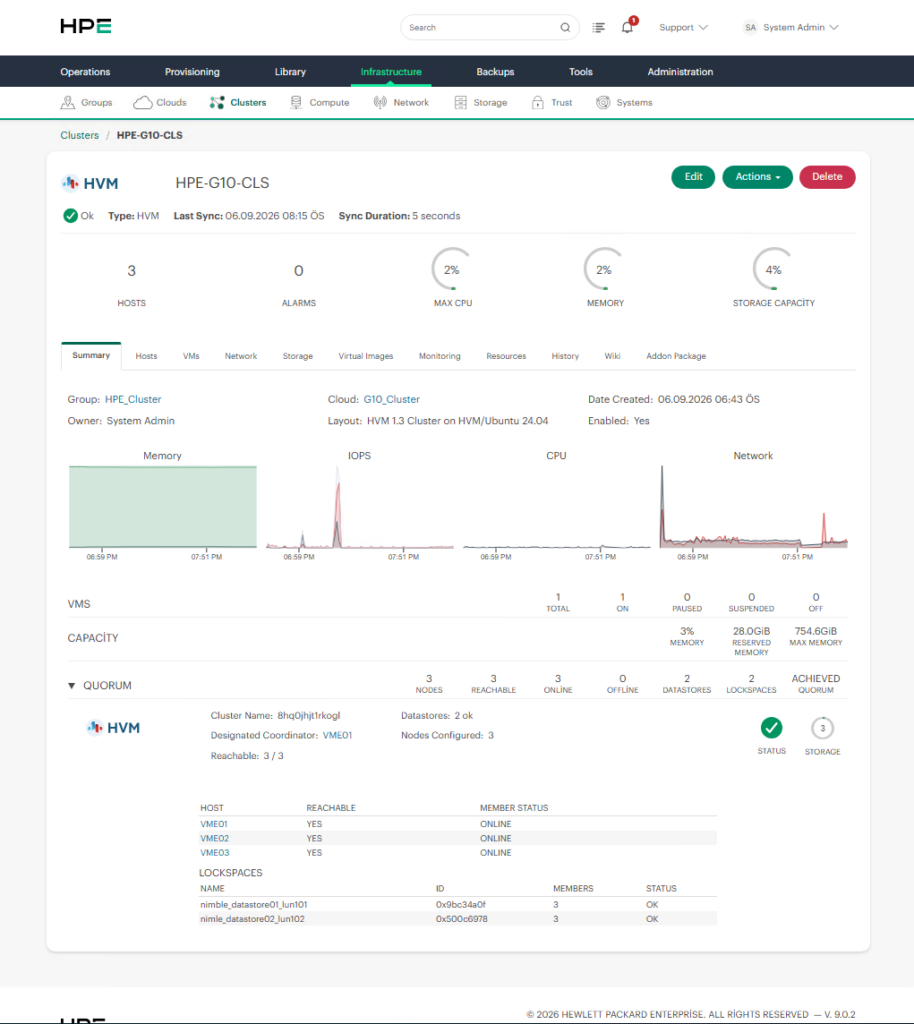
A correct architecture would look like this:
If the datastore is accessible only from HVM01, for example, it is not suitable for heartbeat operations.
When NFS is used, also verify the following:
- Network connectivity
- NFS export permissions
- Firewall rules
- Read/write permissions
- Mount status on all hosts
Any access problem between the hosts and the shared datastore may prevent heartbeat and failover operations from working correctly.
What If the “Heartbeat Target” Option Is Not Available?
In some environments, the Heartbeat Target option may not be visible in the datastore settings.
This can happen when the selected datastore type is not suitable for heartbeat operations.
For example, local storage or host-specific storage may not provide the Heartbeat Target option.
In such cases, you may need to create a new shared datastore.
A typical configuration path would be:
Infrastructure
     ↓
Clusters
     ↓
Select Cluster
     ↓
Storage
     ↓
Data Stores
     ↓
Add
     ↓
Shared NFS / GFS2 Datastore
After the shared datastore is created, verify that all cluster hosts can access it.
Once accessibility has been confirmed, edit the datastore and enable Heartbeat Target.
Check VM Placement Settings
Configuring a heartbeat datastore does not automatically guarantee that every VM will fail over to another host.
The virtual machine’s placement and failover configuration must also allow automatic recovery.
Navigate to the relevant virtual machine and check:
Compute → Virtual Machines → Select VM → Actions → Manage Placement
The VM should use an appropriate placement policy, such as:
Placement: Autoor:
Placement: Failover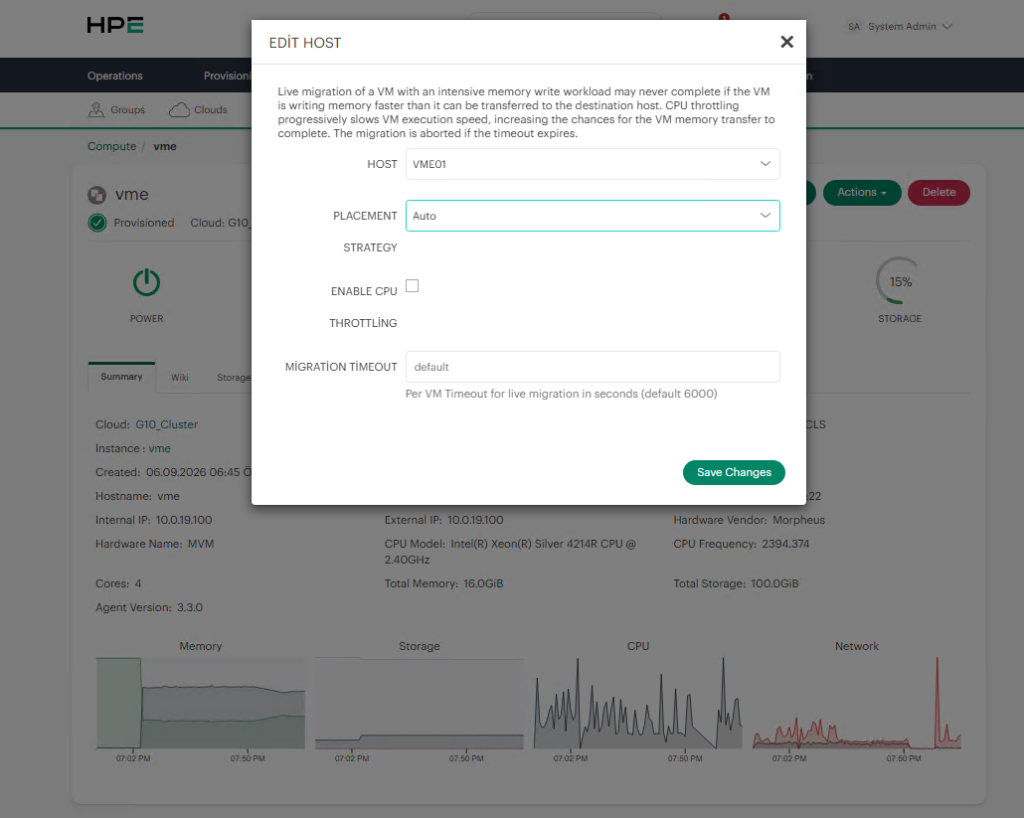
If a VM is pinned to a specific host, the cluster may not be able to restart it automatically on another node after a host failure.
Therefore, VM placement settings should be reviewed as part of the overall failover configuration.
Post-Configuration Checklist
After configuring the heartbeat datastore, verify the following:
- A shared datastore exists in the cluster.
- All HVM hosts can access the datastore.
- The datastore is available with read/write access.
- The datastore is healthy and online.
- Heartbeat Target is enabled.
- VM Auto Recovery is enabled.
- VM Placement is configured as Auto or Failover, where appropriate.
- There are no storage or network connectivity issues between the hosts and the datastore.
Once these checks are completed successfully, the following warning should no longer appear:
This cluster is configured to auto-recover VMs, but no heartbeat datastores are configured.
The “no heartbeat datastores are configured” warning in HPE VM Essentials usually does not indicate a system failure. Instead, it points to an incomplete high-availability configuration.
When VM Auto Recovery is enabled, the cluster requires a shared datastore that can be accessed by all hosts and configured as a Heartbeat Target.
The recommended approach is to first verify the existing shared storage architecture, identify a datastore that is accessible from every host, and configure that datastore for heartbeat operations.
Once the heartbeat datastore and VM placement settings are configured correctly, HPE VM Essentials can more reliably detect host failures and perform the required failover actions to restart affected virtual machines on another available cluster node.

![[TR] HPE VM Essentials’da “No Heartbeat Datastores Are Configured” Uyarısı Nasıl Giderilir?](https://kadirkozan.com/wp-content/uploads/2026/05/hpe_morpheus-ikona-150x150.jpg)