

In enterprise virtualization environments, storage infrastructure plays a critical role in ensuring system performance, availability, and business continuity. When VMware ESXi hosts connect to centralized storage systems such as Huawei OceanStor over Fibre Channel (FC), properly configuring and managing storage paths becomes essential.
Relying on a single connection between an ESXi host and a storage array can introduce a potential single point of failure. If that connection becomes unavailable, virtual machines may lose access to their datastores, potentially resulting in application downtime or service disruption.
To address this challenge, enterprise SAN infrastructures typically use multiple Host Bus Adapters (HBAs), redundant SAN fabrics, and storage controller connections.
VMware ESXi provides a built-in storage path management framework called Native Multipathing (NMP). This technology allows ESXi hosts to access the same Logical Unit Number (LUN) through multiple paths, improving storage availability and enabling I/O distribution according to the configured path selection policy.
In this article, we will examine the Multipathing configuration of three VMware ESXi hosts connected to Huawei OceanStor storage through Fibre Channel.
Using actual ESXCLI command outputs collected from a production environment, we will cover:
- How VMware Native Multipathing works.
- How to identify Huawei storage LUNs from ESXi.
- How to verify Storage Array Type Plugin (SATP) settings.
- How to inspect Path Selection Plugin (PSP) configurations.
- How to configure and validate Huawei-specific SATP rules.
- How to analyze Round Robin IOPS settings.
- How to verify Fibre Channel storage paths.
- How to troubleshoot common ESXCLI errors.
- Best practices for making changes in production environments.
For security and privacy purposes, the original ESXi hostnames have been anonymized.
The hosts referenced throughout this article are:
| ESXi Host | Scope |
|---|---|
| ABC-ESX01 | LUN discovery, SATP rules, Round Robin, and path verification |
| ABC-ESX02 | LUN, SATP, PSP, and working path verification |
| ABC-ESX03 | LUN, SATP, PSP, and working path verification |
All examples are based on storage devices identified by VMware ESXi as HUAWEI / XSG1. The XSG1 value represents the SCSI product identification reported to ESXi. It does not necessarily identify the exact commercial Huawei OceanStor model.
Understanding VMware Native Multipathing (NMP)
VMware Native Multipathing is the built-in framework responsible for managing multiple storage access paths between an ESXi host and a storage device.
NMP helps maintain access to storage devices when individual paths become unavailable and determines how I/O operations are distributed across eligible paths.
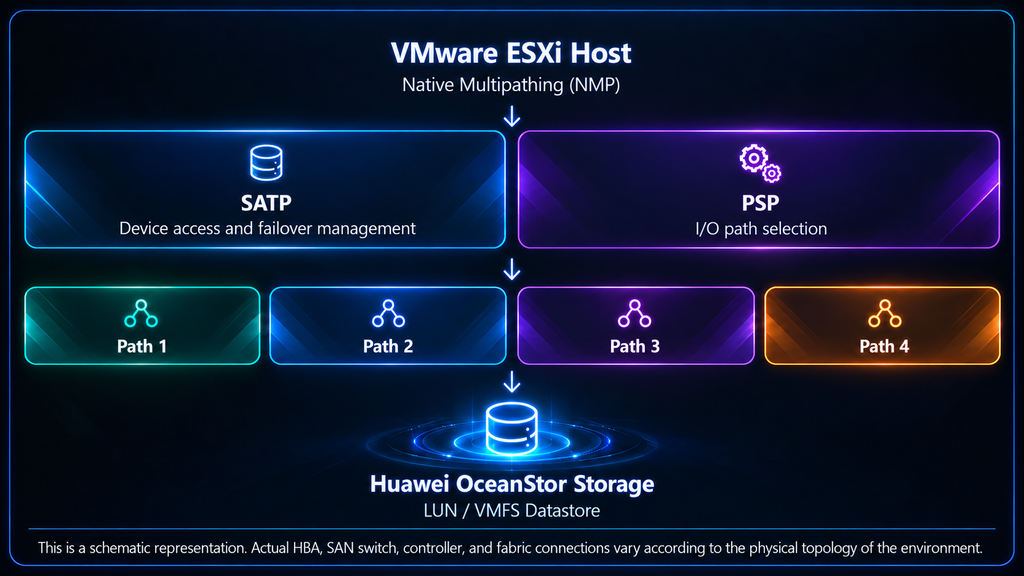
The NMP architecture primarily consists of two components:
1. Storage Array Type Plugin (SATP)
The Storage Array Type Plugin is responsible for handling storage array-specific path management behavior.
SATP determines how ESXi responds to storage path failures and how it manages access to devices with different storage controller architectures.
For example, storage systems may support Active/Active access or Asymmetric Logical Unit Access (ALUA).
The appropriate SATP must be selected according to the storage system’s supported access mode.
Two relevant SATP policies for Huawei storage are:
VMW_SATP_DEFAULT_AA
This plugin is used for compatible Active/Active storage configurations where asymmetric path management is not required.
VMW_SATP_ALUA
This plugin is designed for storage systems that support Asymmetric Logical Unit Access.
In ALUA environments, some paths may be optimized for accessing a LUN, while others may be available but non-optimized.
2. Path Selection Plugin (PSP)
The Path Selection Plugin determines which available storage path ESXi should use when issuing I/O requests.
VMware supports several path selection policies, including:
- Most Recently Used (MRU)
- Fixed
- Round Robin (RR)
In this environment, the Huawei storage LUNs use:
Path Selection Policy: VMW_PSP_RRRound Robin allows I/O operations to be distributed across eligible storage paths based on its configured selection behavior.
The number of paths available for I/O depends on the storage array, SATP configuration, and actual path states.
3. Huawei SATP and PSP Combinations
Huawei defines different SATP rules depending on the storage access mode.
| Huawei Host Access Mode | VMware SATP | VMware PSP |
|---|---|---|
| Load Balancing / ALUA not used | VMW_SATP_DEFAULT_AA | VMW_PSP_RR |
| Asymmetric / ALUA enabled | VMW_SATP_ALUA | VMW_PSP_RR |
For Huawei systems that use initiator switchover modes, the corresponding settings may be called ALUA not used and Special mode.
These settings must be verified in Huawei DeviceManager before modifying the ESXi Multipathing configuration.
Overview of the Huawei Storage Environment
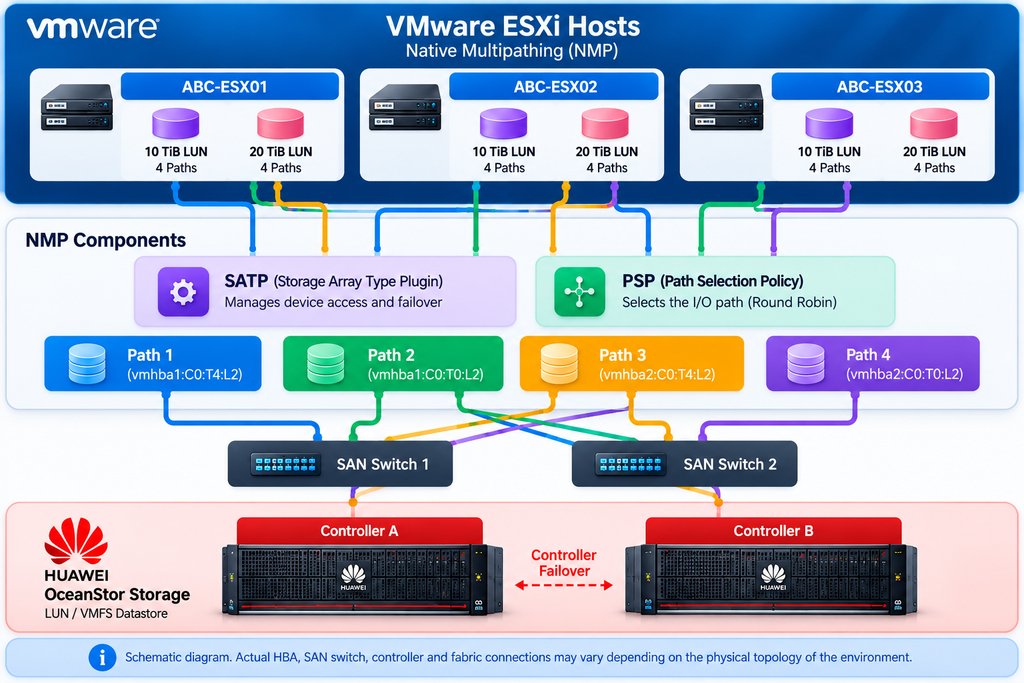
The environment examined in this article consists of three VMware ESXi hosts connected to two Huawei storage LUNs through Fibre Channel.
The storage devices report the following characteristics:
| Property | LUN 1 | LUN 2 |
|---|---|---|
| Capacity | 10 TiB | 20 TiB |
| Vendor | HUAWEI | HUAWEI |
| Model | XSG1 | XSG1 |
| Firmware Revision | 6000 | 6000 |
| Connection | Fibre Channel | Fibre Channel |
| Multipath Plugin | NMP | NMP |
| Device Status | on | on |
| SSD | true | true |
| Thin Provisioning | yes | yes |
| VAAI Status | supported | supported |
The NAA identifiers are:
LUN 1 – 10 TiB
naa.658be72100f678c3000fc01600000001LUN 2 – 20 TiB
naa.658be72100f678c300053b9400000000The NAA identifier is used by VMware ESXi to uniquely identify a storage device.
When executing ESXCLI commands, it is important to use the actual NAA identifier of the target LUN rather than an example identifier copied from documentation.
Discovering Huawei Storage Devices on VMware ESXi
The first step is to verify that the ESXi host correctly detects the Huawei storage LUNs.
Connect to the ESXi host through SSH and run:
esxcli storage core device list | grep -i -A 20 HUAWEIThis command lists devices containing the Huawei vendor identifier along with additional device information.
1. Actual Output from ABC-ESX01
[root@ABC-ESX01:~] esxcli storage core device list | grep -i -A 20 HUAWEI

   Display Name: HUAWEI Fibre Channel Disk (naa.658be72100f678c3000fc01600000001)
   Has Settable Display Name: true
   Size: 10485760
   Device Type: Direct-Access
   Multipath Plugin: NMP
   Devfs Path: /vmfs/devices/disks/naa.658be72100f678c3000fc01600000001
   Vendor: HUAWEI
   Model: XSG1
   Revision: 6000
   SCSI Level: 6
   Is Pseudo: false
   Status: on
   Is RDM Capable: true
   Is Local: false
   Is Removable: false
   Is SSD: true
   Is VVOL PE: false
   Is Offline: false
   Is Perennially Reserved: false
   Queue Full Sample Size: 0
   Queue Full Threshold: 0
   Thin Provisioning Status: yes
   Attached Filters:
   VAAI Status: supported
   Other UIDs: vml.0200020000658be72100f678c3000fc01600000001585347312020
   Is Shared Clusterwide: true
   Is SAS: false

--

   Display Name: HUAWEI Fibre Channel Disk (naa.658be72100f678c300053b9400000000)
   Has Settable Display Name: true
   Size: 20971520
   Device Type: Direct-Access
   Multipath Plugin: NMP
   Devfs Path: /vmfs/devices/disks/naa.658be72100f678c300053b9400000000
   Vendor: HUAWEI
   Model: XSG1
   Revision: 6000
   SCSI Level: 6
   Is Pseudo: false
   Status: on
   Is RDM Capable: true
   Is Local: false
   Is Removable: false
   Is SSD: true
   Is VVOL PE: false
   Is Offline: false
   Is Perennially Reserved: false
   Queue Full Sample Size: 0
   Queue Full Threshold: 0
   Thin Provisioning Status: yes
   Attached Filters:
   VAAI Status: supported
   Other UIDs: vml.0200010000658be72100f678c300053b9400000000585347312020
   Is Shared Clusterwide: true
   Is SAS: false
2. Interpreting the Output
Several fields are particularly important.
Vendor: HUAWEI
Confirms that the storage device identifies itself as a Huawei device.
Model: XSG1
Indicates the SCSI product model presented to the ESXi host.
Multipath Plugin: NMP
Confirms that VMware Native Multipathing manages the device.
Status: on
Indicates that the device is accessible to ESXi at the time of the query.
Is Offline: false
Indicates that the storage device is not marked offline.
Is SSD: true
Shows that the device is reported to ESXi as an SSD.
Thin Provisioning Status: yes
Indicates that thin provisioning capability is reported for the device.
VAAI Status: supported
Shows that VMware Storage APIs for Array Integration capabilities are supported.
These results confirm that both Huawei storage LUNs are detected and managed by NMP.
However, detecting NMP does not automatically confirm that Round Robin is enabled.
To verify the active path selection policy, we must inspect each device individually.
Checking SATP and PSP on ABC-ESX01
After discovering the storage devices, the next step is to identify their active SATP and PSP configurations.
The general command format is:
esxcli storage nmp device list -d <LUN_NAA_ID>Replace <LUN_NAA_ID> with the actual device identifier.
1. Checking the First Huawei LUN
Execute:
esxcli storage nmp device list -d naa.658be72100f678c3000fc01600000001Actual command output:
[root@ABC-ESX01:~] esxcli storage nmp device list -d naa.658be72100f678c3000fc01600000001

naa.658be72100f678c3000fc01600000001

   Device Display Name: HUAWEI Fibre Channel Disk (naa.658be72100f678c3000fc01600000001)
   Storage Array Type: VMW_SATP_DEFAULT_AA
   Storage Array Type Device Config: {action_OnRetryErrors=off}
   Path Selection Policy: VMW_PSP_RR
   Path Selection Policy Device Config: {policy=rr,iops=1000,bytes=10485760,useANO=0; lastPathIndex=3: NumIOsPending=0,numBytesPending=0}
   Path Selection Policy Device Custom Config:
   Working Paths: vmhba1:C0:T4:L2, vmhba1:C0:T0:L2, vmhba2:C0:T6:L2, vmhba2:C0:T5:L2
   Is USB: false

[root@ABC-ESX01:~]
The output confirms:
Storage Array Type: VMW_SATP_DEFAULT_AA
The device currently uses the default Active/Active SATP.
Path Selection Policy: VMW_PSP_RR
Round Robin is enabled.
IOPS: 1000
The current I/O-based path switching threshold is configured as 1,000.
Working Paths
vmhba1:C0:T4:L2
vmhba1:C0:T0:L2
vmhba2:C0:T6:L2
vmhba2:C0:T5:L2
Four working paths are listed.
Two paths are associated with vmhba1, and two paths are associated with vmhba2.
This confirms that the ESXi host has multiple reported working paths to the Huawei LUN.
2. Checking the Second Huawei LUN
Execute:
esxcli storage nmp device list -d naa.658be72100f678c300053b9400000000Actual output:
[root@ABC-ESX01:~] esxcli storage nmp device list -d naa.658be72100f678c300053b9400000000

naa.658be72100f678c300053b9400000000

   Device Display Name: HUAWEI Fibre Channel Disk (naa.658be72100f678c300053b9400000000)
   Storage Array Type: VMW_SATP_DEFAULT_AA
   Storage Array Type Device Config: {action_OnRetryErrors=off}
   Path Selection Policy: VMW_PSP_RR
   Path Selection Policy Device Config: {policy=rr,iops=1000,bytes=10485760,useANO=0; lastPathIndex=3: NumIOsPending=0,numBytesPending=0}
   Path Selection Policy Device Custom Config:
   Working Paths: vmhba1:C0:T4:L1, vmhba1:C0:T0:L1, vmhba2:C0:T6:L1, vmhba2:C0:T5:L1
   Is USB: false

[root@ABC-ESX01:~]
The second LUN uses the same SATP and PSP policies.
Both Huawei LUNs on ABC-ESX01 therefore share a consistent Multipathing configuration:
- SATP:
VMW_SATP_DEFAULT_AA - PSP:
VMW_PSP_RR - Round Robin IOPS:
1000 - Reported working paths per LUN:
4
Verifying Multipathing on ABC-ESX02
In VMware clusters, verifying only one ESXi host is insufficient.
Every host accessing the same shared storage should be checked to ensure that its Multipathing configuration is appropriate and consistent.
We therefore repeated the verification on ABC-ESX02.
1. First Huawei LUN
Command:
esxcli storage nmp device list -d naa.658be72100f678c3000fc01600000001Actual output:
[root@ABC-ESX02:~] esxcli storage nmp device list -d naa.658be72100f678c3000fc01600000001

naa.658be72100f678c3000fc01600000001

   Device Display Name: HUAWEI Fibre Channel Disk (naa.658be72100f678c3000fc01600000001)
   Storage Array Type: VMW_SATP_DEFAULT_AA
   Storage Array Type Device Config: {action_OnRetryErrors=off}
   Path Selection Policy: VMW_PSP_RR
   Path Selection Policy Device Config: {policy=rr,iops=1000,bytes=10485760,useANO=0; lastPathIndex=1: NumIOsPending=0,numBytesPending=0}
   Path Selection Policy Device Custom Config:
   Working Paths: vmhba1:C0:T3:L2, vmhba1:C0:T6:L2, vmhba2:C0:T7:L2, vmhba2:C0:T6:L2
   Is USB: false

[root@ABC-ESX02:~]
2. Second Huawei LUN
Command:
esxcli storage nmp device list -d naa.658be72100f678c300053b9400000000Actual output:
[root@ABC-ESX02:~] esxcli storage nmp device list -d naa.658be72100f678c300053b9400000000

naa.658be72100f678c300053b9400000000

   Device Display Name: HUAWEI Fibre Channel Disk (naa.658be72100f678c300053b9400000000)
   Storage Array Type: VMW_SATP_DEFAULT_AA
   Storage Array Type Device Config: {action_OnRetryErrors=off}
   Path Selection Policy: VMW_PSP_RR
   Path Selection Policy Device Config: {policy=rr,iops=1000,bytes=10485760,useANO=0; lastPathIndex=2: NumIOsPending=0,numBytesPending=0}
   Path Selection Policy Device Custom Config:
   Working Paths: vmhba1:C0:T3:L1, vmhba1:C0:T6:L1, vmhba2:C0:T7:L1, vmhba2:C0:T6:L1
   Is USB: false

[root@ABC-ESX02:~]
The results demonstrate that both Huawei LUNs on ABC-ESX02 use the same SATP and PSP policies as ABC-ESX01. Each LUN also reports four working paths across two Fibre Channel adapters.
Verifying Multipathing on ABC-ESX03
The same verification was performed on the third ESXi host.
1. First Huawei LUN
Command:
esxcli storage nmp device list -d naa.658be72100f678c3000fc01600000001Actual output:
[root@ABC-ESX03:~] esxcli storage nmp device list -d naa.658be72100f678c3000fc01600000001

naa.658be72100f678c3000fc01600000001

   Device Display Name: HUAWEI Fibre Channel Disk (naa.658be72100f678c3000fc01600000001)
   Storage Array Type: VMW_SATP_DEFAULT_AA
   Storage Array Type Device Config: {action_OnRetryErrors=off}
   Path Selection Policy: VMW_PSP_RR
   Path Selection Policy Device Config: {policy=rr,iops=1000,bytes=10485760,useANO=0; lastPathIndex=2: NumIOsPending=0,numBytesPending=0}
   Path Selection Policy Device Custom Config:
   Working Paths: vmhba1:C0:T4:L2, vmhba1:C0:T1:L2, vmhba2:C0:T5:L2, vmhba2:C0:T4:L2
   Is USB: false

[root@ABC-ESX03:~]
2. Second Huawei LUN
Command:
esxcli storage nmp device list -d naa.658be72100f678c300053b9400000000Actual output:
[root@ABC-ESX03:~] esxcli storage nmp device list -d naa.658be72100f678c300053b9400000000

naa.658be72100f678c300053b9400000000

   Device Display Name: HUAWEI Fibre Channel Disk (naa.658be72100f678c300053b9400000000)
   Storage Array Type: VMW_SATP_DEFAULT_AA
   Storage Array Type Device Config: {action_OnRetryErrors=off}
   Path Selection Policy: VMW_PSP_RR
   Path Selection Policy Device Config: {policy=rr,iops=1000,bytes=10485760,useANO=0; lastPathIndex=3: NumIOsPending=0,numBytesPending=0}
   Path Selection Policy Device Custom Config:
   Working Paths: vmhba1:C0:T4:L1, vmhba1:C0:T1:L1, vmhba2:C0:T5:L1, vmhba2:C0:T4:L1
   Is USB: false

[root@ABC-ESX03:~]
The third ESXi host reports the same Multipathing configuration as the other two hosts.
3. Comparing All Three ESXi Hosts
| Configuration | ABC-ESX01 | ABC-ESX02 | ABC-ESX03 |
|---|---|---|---|
| Huawei LUNs | 2 | 2 | 2 |
| SATP | DEFAULT_AA | DEFAULT_AA | DEFAULT_AA |
| PSP | Round Robin | Round Robin | Round Robin |
| Round Robin IOPS | 1000 | 1000 | 1000 |
| LUN 1 Working Paths | 4 | 4 | 4 |
| LUN 2 Working Paths | 4 | 4 | 4 |
| FC HBAs | vmhba1/vmhba2 | vmhba1/vmhba2 | vmhba1/vmhba2 |
The comparison confirms that all three ESXi hosts use consistent SATP, PSP, and Round Robin IOPS configurations. Across three hosts and two LUNs, the outputs contain 24 logical host-LUN-path entries. This does not imply the existence of 24 independent physical cables or SAN connections.
Configuring Huawei-Specific SATP Rules
Huawei storage systems may require different SATP rules depending on the configured access mode. For devices identified as HUAWEI / XSG1, two relevant rules are available.
1. Load Balancing / ALUA Not Used
For Huawei storage configured with Load Balancing or the equivalent ALUA not used initiator mode, the following rule can be used:
esxcli storage nmp satp rule add \
-V HUAWEI \
-M XSG1 \
-s VMW_SATP_DEFAULT_AA \
-P VMW_PSP_RR \
-c tpgs_off
This command creates a SATP rule matching Huawei XSG1 devices that do not use TPGS/ALUA. The matching devices are assigned the Active/Active SATP with Round Robin as the default PSP.
2. Asymmetric / ALUA Enabled
For Huawei storage configured with Asymmetric access or the corresponding Special mode, the following rule can be used:
esxcli storage nmp satp rule add \
-V HUAWEI \
-M XSG1 \
-s VMW_SATP_ALUA \
-P VMW_PSP_RR \
-c tpgs_on
This rule matches Huawei XSG1 devices that use TPGS/ALUA and assigns the ALUA SATP with Round Robin. Both rules can coexist on an ESXi host because they use different TPGS matching conditions.
3. Command Parameter Explanation
| Parameter | Description |
|---|---|
-V HUAWEI | Storage vendor identifier |
-M XSG1 | Storage product model identifier |
-s | SATP policy to assign |
-P VMW_PSP_RR | Default Round Robin PSP |
-c tpgs_off | Match devices without TPGS |
-c tpgs_on | Match devices with TPGS |
These commands modify the host’s SATP rule configuration and should not be executed without first checking existing rules and verifying the Huawei storage access mode.
Adding and Verifying SATP Rules on ABC-ESX01
The collected terminal logs show that both Huawei SATP rules were added on ABC-ESX01.
First, the Active/Active rule was executed:
[root@ABC-ESX01:~] esxcli storage nmp satp rule add \
> -V HUAWEI \
> -M XSG1 \
> -s VMW_SATP_DEFAULT_AA \
> -P VMW_PSP_RR \
> -c tpgs_off

[root@ABC-ESX01:~]
Next, the ALUA rule was executed:
[root@ABC-ESX01:~] esxcli storage nmp satp rule add \
> -V HUAWEI \
> -M XSG1 \
> -s VMW_SATP_ALUA \
> -P VMW_PSP_RR \
> -c tpgs_on

[root@ABC-ESX01:~]
After both commands returned to the shell prompt, the administrator listed the existing Huawei SATP rules:
esxcli storage nmp satp rule list | grep -i HUAWEI1. Actual SATP Rule Output
The columns below have been aligned for readability.
[root@ABC-ESX01:~] esxcli storage nmp satp rule list | grep -i HUAWEI

VMW_SATP_ALUA        HUAWEI  XSG1        system  tpgs_on   VMW_PSP_RR
VMW_SATP_ALUA        Huawei  VBS fileIO  system  tpgs_on   VMW_PSP_RR
VMW_SATP_ALUA        HUAWEI  XSG1        user    tpgs_on   VMW_PSP_RR
VMW_SATP_DEFAULT_AA  HUAWEI  XSG1        system  tpgs_off  VMW_PSP_RR
VMW_SATP_DEFAULT_AA  Huawei  VBS fileIO  system  tpgs_off  VMW_PSP_RR
VMW_SATP_DEFAULT_AA  HUAWEI  XSG1        user    tpgs_off  VMW_PSP_RR

[root@ABC-ESX01:~]
The output shows that Huawei XSG1 devices have both system-defined and user-defined SATP rules.
2. Understanding System and User Rules
System Rules
These are built-in SATP rules supplied by VMware ESXi.
They define default matching behavior for supported storage vendors and models.
User Rules
These are additional SATP rules created by an administrator or automation tool.
Depending on the matching conditions, user rules may take precedence over system rules.
The Huawei XSG1 entries can be summarized as follows:
| SATP | Vendor / Model | Rule Type | Claim Option | PSP |
|---|---|---|---|---|
| VMW_SATP_ALUA | HUAWEI / XSG1 | system | tpgs_on | VMW_PSP_RR |
| VMW_SATP_ALUA | HUAWEI / XSG1 | user | tpgs_on | VMW_PSP_RR |
| VMW_SATP_DEFAULT_AA | HUAWEI / XSG1 | system | tpgs_off | VMW_PSP_RR |
| VMW_SATP_DEFAULT_AA | HUAWEI / XSG1 | user | tpgs_off | VMW_PSP_RR |
The user-defined rules appear to duplicate the visible SATP, PSP, and TPGS settings of the existing system rules. Therefore, the additional user rules do not appear necessary simply to enable Round Robin in this environment. However, rules should not be removed without first verifying their complete parameters, purpose, and possible effects on storage device claiming. The separate Huawei / VBS fileIO entries are associated with a different model identifier and should not be confused with the XSG1 rules.
Do Newly Added SATP Rules Apply Immediately?
Adding a SATP rule does not necessarily change the SATP currently assigned to an existing LUN.
When a new storage device is discovered, ESXi evaluates the available claim rules and selects the appropriate storage management plugin.
For LUNs already claimed by NMP, a newly added SATP rule may not take effect until the device is claimed again.
Depending on the environment and VMware version, a planned ESXi host restart may be required.
In the collected terminal logs, both SATP rule addition commands completed and the corresponding user-defined rules appeared in the rule list.
However, there is no evidence in the provided logs that the ESXi host was subsequently restarted or that existing LUNs were reclaimed.
The device outputs continue to show:
Storage Array Type: VMW_SATP_DEFAULT_AA
Path Selection Policy: VMW_PSP_RR
This confirms the active policies, but not that a new claim operation took place.
Since Round Robin was already active, no additional action is justified solely to enable this policy.
Understanding Round Robin IOPS Settings
All six host-LUN combinations in the environment report the following PSP configuration:
Path Selection Policy: VMW_PSP_RR
Path Selection Policy Device Config:
{policy=rr,iops=1000,bytes=10485760,useANO=0; ...}
The parameters can be interpreted as follows:
policy=rr
Indicates that the Round Robin PSP is enabled.
iops=1000
Specifies the I/O count threshold used for I/O-based path switching.
bytes=10485760
Represents the configured byte threshold of 10 MiB for byte-based path switching.
useANO=0
Controls the use of Active Non-Optimized paths in relevant ALUA configurations.
lastPathIndex
Identifies the last path index recorded by the Round Robin policy.
Different lastPathIndex values between hosts do not automatically indicate a problem.
Should Round Robin IOPS Be Changed to 1?
Some Huawei storage connectivity recommendations specify an IOPS value of 1 for certain configurations.
A lower IOPS threshold can result in more frequent path selection changes, but it does not guarantee better performance in every environment.
The optimal setting depends on storage architecture, controller behavior, firmware, VMware compatibility, and workload characteristics.
If Huawei’s official documentation for the specific storage model recommends IOPS=1, the following device-specific command can be used:
esxcli storage nmp psp roundrobin deviceconfig set \
--device naa.658be72100f678c3000fc01600000001 \
--type iops \
--iops 1
After making the change, verify the configuration:
esxcli storage nmp device list -d naa.658be72100f678c3000fc01600000001This command modifies the Round Robin configuration of the specified LUN only.
It does not automatically change other LUNs or ESXi hosts.
In the examined environment, the current value is 1000.
No verified performance issue or model-specific vendor recommendation was provided that would justify changing this value immediately.
Verifying Fibre Channel Storage Paths
SATP and PSP verification is important, but it does not provide a complete picture of physical SAN connectivity.
Each ESXi host should also be checked for storage path states, Fibre Channel adapter status, and fabric redundancy.
1. Check Paths for the First LUN
esxcli storage core path list -d naa.658be72100f678c3000fc016000000012. Check Paths for the Second LUN
esxcli storage core path list -d naa.658be72100f678c300053b9400000000These commands show path-level information, including adapters, targets, LUN identifiers, and current path states.
3. List Fibre Channel Adapters
esxcli storage san fc listThis command helps identify Fibre Channel HBAs and inspect their reported details.
4. Review Path Statistics
esxcli storage core path stats getPath statistics can help identify potential transport errors or other abnormalities.
The presence of four working paths for each LUN is a positive observation.
However, it does not independently prove that every physical path is healthy or that SAN fabric redundancy has been configured correctly.
Further verification should include Fibre Channel zoning, switch port status, HBA connectivity, and Huawei storage controller port availability.
Best Practices for Production Environments
SATP and PSP settings directly affect storage access behavior. Changes to these settings should therefore be treated as production infrastructure changes.
Before modifying a working configuration, administrators should verify the current Huawei storage access mode and compare it with the active VMware SATP configuration.
Existing settings should be documented, including LUN identifiers, SATP assignments, PSP policies, IOPS thresholds, and available paths.
If a change is required, it should be performed during a planned maintenance window.
Where possible, virtual machines should be migrated away from the affected ESXi host, and the host should be placed into Maintenance Mode before operations requiring a restart.
After the change, administrators should verify datastore accessibility, device recognition, SATP/PSP policies, and physical storage path states.
A practical checklist includes:
- Confirm the Huawei storage model and firmware version.
- Verify Host Access Mode or Initiator Switchover Mode.
- Identify all Huawei LUNs and their NAA identifiers.
- Record existing SATP and PSP settings.
- Review system-defined and user-defined SATP rules.
- Confirm Fibre Channel path states and SAN fabric redundancy.
- Validate any proposed Round Robin IOPS change against Huawei guidance.
- Perform changes during an approved maintenance window.
- Verify datastore accessibility and Multipathing configuration afterward.
- Document the final configuration and any deviations from the baseline.
For the environment examined in this article, no evidence indicates that a SATP or PSP change is currently required.
This investigation reviewed the VMware Native Multipathing configuration of three ESXi hosts connected to Huawei OceanStor storage through Fibre Channel.
The command outputs confirm that:
- Three ESXi hosts access two Huawei LUNs.
- All six host-LUN combinations are managed through VMware NMP.
- Every examined LUN uses
VMW_SATP_DEFAULT_AA. - Round Robin (
VMW_PSP_RR) is enabled on all three hosts. - The configured Round Robin IOPS threshold is 1000.
- Four working paths are reported for each host-LUN combination.
- The examined environment therefore contains 24 logical host-LUN-path entries.
- ABC-ESX01 contains both system and user-defined SATP rules for Huawei XSG1 devices.
- The user-defined rules duplicate the visible SATP, PSP, and TPGS matching values of the corresponding system rules.
The results show a consistent SATP and PSP configuration across all three ESXi hosts.
The additional SATP rules do not appear necessary solely to enable Round Robin, since the existing LUNs are already using that policy.
Nevertheless, the Huawei DeviceManager Host Access Mode, exact storage model, firmware compatibility, and physical Fibre Channel path states should be verified before declaring the entire configuration fully optimized.
The main conclusion is that the existing VMware Multipathing configuration is consistent across the three examined hosts, and Round Robin is already enabled. Rather than introducing unnecessary SATP or IOPS changes, the next priority should be validating storage access mode compatibility and Fibre Channel path health.
Properly designed and regularly verified Multipathing configurations help maintain storage availability, improve resilience against connection failures, and support efficient utilization of enterprise SAN infrastructure.